
Add a custom button or modify a link in your text to open ReelFlow Overlay Player with a click - it’s extremely easy - any link on your page can be set-up to open or close the Player with no coding or setting changes required. If your website builder or CMS lets you set a link destination (the URL or "href"), you can just use these special values in the editor:
- Open the player:
#reelflow-player-open - Close the player (back to eye-catcher):
#reelflow-player-close
This approach is pretty universal, as long as you can add a link to a page, and no matter what CMS you use e.g. Wordpress, Webflow etc.
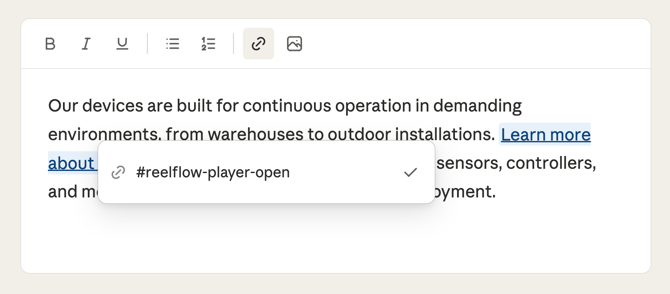
How to set it up
- In your CMS or website builder, find the button or link you want to use.
- Set the link destination (sometimes labelled "URL", "Link", or "href") to one of the values above - for example,
#reelflow-player-open. - Save and publish the changes to your page.
- Ensure you have published an Overlay Flow on the page. In the ↗️ activation tab in Flow Builder, you can turn off the eye-catcher entirely, if you want your link to be the only way of launching the Player experience.
- Click the link - the Overlay Player will open or close accordingly.
Things to know and troubleshooting
- This works with any clickable element you can attach a link to - buttons, text links, images, etc.
- This technique will not work well on pages with multiple Overlay Flows published at once. In that instance you may need to use the ↗️ Player API instead, to ensure specific links open specific Flows.
- "Can I use this on multiple buttons?" - Yes, the same value can be used on as many links as needed.
- Both values must be entered exactly as shown, including the
#at the start. - The page will not scroll or navigate anywhere when the link is clicked. It only controls the Player. If you remove or unpublish the Overlay Flow, clicking the link won’t do anything.
- Links clicked are tracked as eye-catcher clicks and player closes in the performance metrics.
- If you want to do the same thing without using a link, you can also just attach one of these two classes to the element, which do the same thing when clicked:
.reelflow-player-openor.reelflow-player-close - "My button isn't doing anything" — Check that the href is set exactly as
#reelflow-player-openor#reelflow-player-close, with no extra spaces or characters, and that the ReelFlow script is installed on the page. - To extend or modify the way ReelFlow works on your page, like hiding the eye-catcher on page load, ↗️ you can use our Player API.