
Our Performance metrics dashboard helps you understand how your Flows are performing across your whole website.
Viewing your Performance Metrics summary
From the top of ↗️ Performance metrics screen, you'll see key aggregate metrics across all your Flows.
Use the toggle switch in the top right corner to show or hide the definitions, as you wish.
Use the filters at the top of the table on this page to adjust the summarized date period, and control which Flows are included in the metrics.
Metrics on this screen are updated daily and reflect activity from Published Flows.
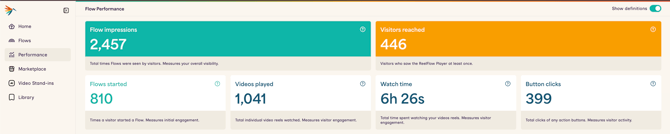
Definitions of summarized Performance metrics
Summary of Flow impressions
Total times Flows were seen by visitors. Measures your overall visibility.
This counts each time the first video of any Flow is displayed and playable on a page. Whether it's an Overlay or Inline Player, if it appears on the page, that's one Flow impression.
This number is not de-duplicated by visitor, so if the same person reloads a page or visits multiple pages with Flows, each appearance counts.
Summary of Visitors reached
Visitors who saw the ReelFlow Player at least once.
This is an estimate of unique individuals who had at least one Flow impression on your site.
Because fingerprinting isn't 100% accurate, this is an estimate. For example, multiple people browsing from the same location might be grouped as one visitor.
Summary of Flows started
Times a visitor started a Flow. Measures initial engagement.
This counts every time a Flow starts playing:
- For Inline players: This typically happens automatically when the player comes into view
- For Overlay players: This requires a visitor to interact with the eye-catcher
Example: If Sarah interacts with a Overlay Flow on your homepage, that's +1 "Flows started." If she reloads the page and interacts again, that's another +1, for a total of 2.
Summary of Visitor interaction
Percentage of visitors who interacted with the ReelFlow Player at least once. Measures visitor engagement.
This rate is calculated as the average of the number of Flows started divided by the numbers of Visitors reached. It is a good indicator of visitor engagement.
Summary of Videos played
Total individual video reels watched. Measures visitor engagement.
This is the total number of times any reel in any Flow starts to play.
Example: If Sarah visits the same page 3 times and starts playing video each time, that generates at least 3 videos played - more if she replays any reel videos.
Note: Watch time is generally a more meaningful metric than Videos played, as it reflects actual engagement rather than just the act of starting to play a video.
Summary of Watch time
Total time spent watching your videos reels. Measures visitor engagement.
This is the number of days, hours, minutes and seconds visitors have spent watching your video content.
Note: How we record and calculate Watch Time changed on 15th December 2025, meaning data before this date is not available or directly comparable.
Summary of Button clicks
Total clicks of any action buttons. Measures visitor activity.
This counts every click or tap a visitor makes on an Action Button within your Flows - buttons that navigate to another Flow, open a URL, or close the player.
Button clicks do not include:
- Eye-catcher clicks
- Mute buttons
- Play/pause controls
- Other player control buttons
Understanding Per-Flow Performance metrics
Learn about Per Flow Performance metrics, or Button-level Performance for Flows here.
Note: Our Performance metrics dashboard provides deeper data insights than ever before. Because of these calculation improvements in February 2026, values in export files before this date may differ from current dashboard calculations. To work around this, re-run historic date periods in your Workspace to get the most up-to-date, comparable data.