
-
From the ReelFlow Dashboard, select Flows from the sidebar navigation and then Build a Flow.
-
Choose a Player Type:
- Overlay Player: Appears in the bottom-left or bottom-right corner of the page, floating above the page content.
- Inline Player: Embeds directly in and amongst your existing webpage content.
Note: Player type cannot be changed after the Flow is created.
-
Your Flow is immediately available to edit in the Flow Builder.
Renaming a Flow
1. While in the Flow Builder, click on the Flow title, or choose Rename from the dropdown menu
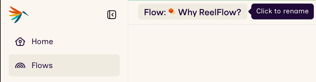
👉 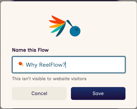
2. Update the title using the modal that appears. Press Save.
Deleting a Flow
From the Flows screen in the Dashboard:
- On the Flows screen, locate the row representing the flow you wish to delete
- Select Delete from the dropdown menu at the far end of the row
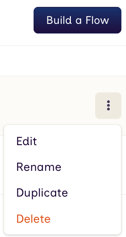
From the Flow Builder:
- In the Flow Builder, select Delete from the dropdown menu in the top right of the screen
- Select Delete from the dropdown menu at the far end of the row
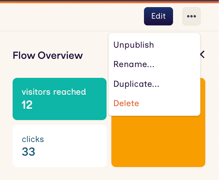
Archiving and Unarchiving Flows
Archiving Flows can be useful for tidying up your Workspace whilst retaining any historic Performance data, rather than deleting it.
Archived Flows are hidden from any searches and lists of Flows on the Performance and Flows screens.
Archiving from ↗️ Flows in the Dashboard:
- On the Flows screen, locate the row representing the Flow you wish to archive or unarchive
- Select Archive or Unarchive from the dropdown menu at the far end of the row
Archiving from the Flow Builder:
- In the Flow Builder, select Archive or Unarchive from the dropdown menu in the top right of the screen
- Select Archive or Unarchive from the dropdown menu at the far end of the row
Duplicating an existing Flow
From the Flows screen in the Dashboard:
- On the Flows screen, locate the row representing the flow you wish to duplicate
- Select Duplicate… from the dropdown menu at the far end of the row
- Give the Flow an appropriate name
- Press Create Duplicate to finish
From the Flow Builder:
- In the Flow Builder, select Duplicate… from the dropdown menu in the top right of the screen
- Rename the Flow
- Press Create Duplicate to finish