
Add and draft Scripts in the Flow Builder
To assist with planning your Flows, you can prepare, draft and store scripts against Steps in the Flow Builder.
How to add or edit a script for a Flow Step
- From ↗️ Flows in the Dashboard, build a new Flow, or open the Flow you would like to work on, and choose Edit to enter the Flow Builder
- Tap on the Script icon that is tucked behind the Step you want to add or edit a script for
- The Step Script flyover will open and you can draft your script in the text area
- Close the flyover when you are done
Tips for writing great Flow Scripts
Looking for a guide to write high performing scripts for you videos? Read our Flow scripting guide
Exporting Scripts for teleprompters or to review
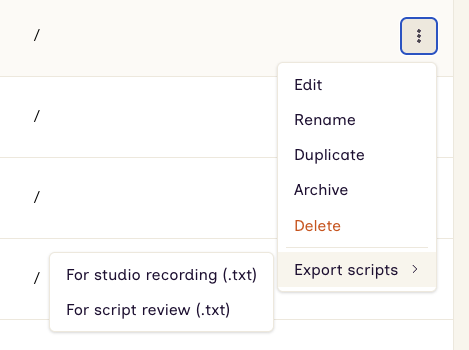
You can export your Flow scripts in a simple text file format, which makes it ideal for using with most teleprompter software. There are two options:
For Studio recording
Groups scripts by the person starring in each video, sorted alphabetically by the name of the subject. Useful for batching shoots by presenter.
For Script review
Scripts ordered by their sequence in the Flkow - the path a viewer would take from start to finish. Useful for reviewing the full narrative in order.
How to export Scripts for a Flow
- From the table of ↗️ Flows in the Dashboard, select the dropdown menu at the end of the row
- Choose Export scripts, and select from the options
- The file will download to your device
Note that the Step reference numbers shown in the Flow Builder will change if you remove or alter Steps in the Flow.